How to Automate Lead Follow-Up for a Small Business
By Oliver Bennet, webmaster and AI systems consultant
Short answer: the simplest lead follow-up automation for a small business is this: every new inquiry should create a CRM contact, assign a next step, send an internal alert, and start a polite follow-up sequence if nobody replies manually.
I have seen a lot of small businesses lose leads for boring reasons. Not because the offer was bad. Not because the website was ugly. The lead came in, somebody meant to reply, the day got busy, and the opportunity quietly disappeared.
That is exactly the kind of problem automation should fix. Not by pretending to be a human. Not by blasting robotic emails. Just by making sure no lead sits forgotten in an inbox.
This guide walks through a practical lead follow-up workflow you can build with common tools like a form, CRM, calendar, email, and automation platform.
Affiliate disclosure: AI Biz Brief may earn a commission if you buy through some links in this article. That does not change the price you pay, and it does not decide what I recommend.
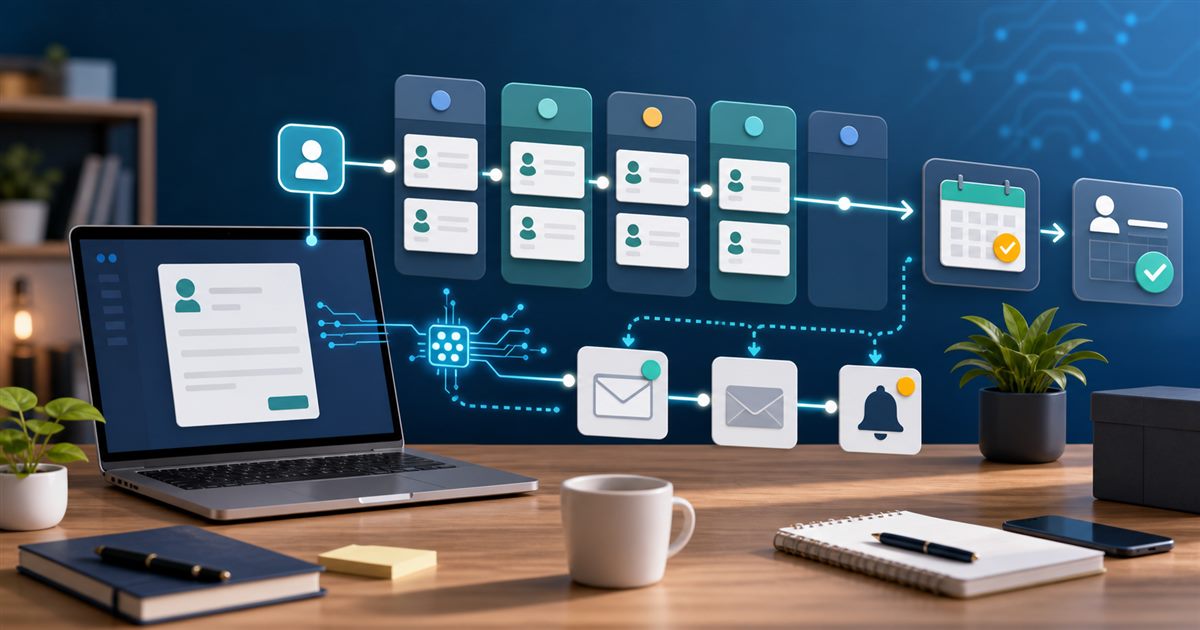
The lead follow-up workflow in one picture
Here is the basic system:
- A lead submits a form, books a call, sends an email, or requests a quote.
- The lead is added to your CRM.
- The business owner or sales person gets an alert.
- A follow-up task is created.
- If the lead books a call or replies, the automation stops or changes track.
- If the lead does not respond, a short sequence follows up over several days.
That is it. You do not need a complex AI agent to start. You need a clean path from inquiry to next action.
Tools you need
| Part of the system | Example tools | What it does |
|---|---|---|
| Lead capture | Website form, landing page form, booking form | Collects name, email, phone, service needed, and message. |
| CRM | HubSpot lead management, Pipedrive, Zoho, or similar | Stores the lead and tracks the follow-up status. |
| Automation layer | Zapier, Make | Moves data between forms, CRM, email, calendar, and notifications. |
| Scheduling | Calendly Workflows or similar | Sends booking reminders, follow-ups, and meeting-related messages. |
| AI assistant | ChatGPT, Claude, or your CRM’s AI tools | Drafts email variations and summarizes lead context. |
Step 1: Define what counts as a lead
Before you automate anything, decide what should enter the system. For most small businesses, a lead is any person who does one of these:
- Submits a contact form
- Requests a quote
- Books a consultation
- Calls and leaves a message
- Replies to an email campaign
- Downloads a high-intent checklist or guide
Do not overcomplicate this. If somebody shows intent, they should enter the CRM.
Step 2: Capture the right information
A weak form creates weak follow-up. You do not need a 20-field form, but you do need enough context to respond well.
For most service businesses, I like these fields:
- Name
- Phone number
- Business name, if relevant
- Service needed
- Timeline
- Short message
- Consent checkbox for follow-up, where appropriate
If you serve multiple locations or industries, capture that too. The better your intake data, the more useful your automation becomes.
Step 3: Send every lead into a CRM
This is the step many owners skip. They use email as the CRM. That works until it does not.
A CRM gives each lead a record, a status, a next step, and a history. HubSpot describes lead management software as a way to bring lead touchpoints together and help teams make informed follow-ups. That is the goal: one place to see who asked for what, when they asked, and what happens next.
Your first CRM pipeline can be simple:
- New lead
- Contacted
- Appointment booked
- Proposal sent
- Won
- Lost or not a fit
That is enough to start. You can add complexity after the team actually uses it.
Step 4: Create an instant internal alert
When a lead comes in, somebody should know immediately. That alert can be:
- SMS
- Slack
- Microsoft Teams
- CRM task notification
The alert should include the lead’s name, contact info, requested service, source, and link to the CRM record. Do not make the person hunt for context.
Step 5: Create the first follow-up task
Automation should not remove responsibility. It should assign it clearly.
For example:
Task: Call new lead within 15 minutes.
Owner: Sales inbox or assigned team member.
Due: Today.
Notes: Include form message and source.
If you are a solo owner, assign it to yourself. If you have a team, assign by territory, service type, or round-robin.
Step 6: Send a human-sounding first reply
The first automated email should not pretend that a person wrote a custom essay. Keep it simple and useful.
Example:
Hi [First Name], thanks for reaching out. I got your request about [Service]. I will review the details and follow up shortly. If you want to pick a time now, you can use this link: [Booking Link].
That message does three things: confirms receipt, names the request, and gives the lead a next step.
Step 7: Add a light follow-up sequence
If the lead does not reply or book a call, use a short sequence. I usually recommend three touches:
- Day 0: confirmation and booking link
- Day 2: helpful follow-up with one clarifying question
- Day 5: polite close-the-loop message
That is enough for many businesses. More than that can feel pushy unless the lead asked for a detailed sales process.
Step 8: Stop the automation when the lead takes action
This is where many follow-up systems go wrong. If someone books a call, replies, or becomes a customer, they should not keep receiving generic reminders.
Your automation should check for status changes:
- If appointment is booked, stop the sales follow-up sequence.
- If email reply is received, create a manual review task.
- If deal is marked lost, stop promotional follow-up.
- If lead becomes a customer, move them to onboarding.
Good automation knows when to stop.
Step 9: Use AI to draft, not to decide
AI can help write follow-up variations, summarize lead context, and suggest next steps. But I would not let AI decide who gets pricing, who gets rejected, or what promises are made.
A safe AI role looks like this:
- Summarize the lead’s request
- Draft a reply for human review
- Suggest three clarifying questions
- Rewrite a message in a warmer tone
- Turn a call note into a CRM summary
That keeps AI useful without making it reckless.
Example automation recipe
Here is a simple version you can build in Zapier or Make:
- Trigger: new website form submission
- Action: create or update CRM contact
- Action: create deal or opportunity
- Action: send internal alert to owner or sales team
- Action: create follow-up task due today
- Action: send confirmation email to lead
- Delay: wait two days
- Filter: continue only if lead status is still New or Contacted
- Action: send second follow-up email
- Delay: wait three more days
- Filter: continue only if no booking or reply happened
- Action: send close-the-loop message
Build the simple version first. You can always add lead scoring, AI summaries, or routing later.
Follow-up email templates
First response
Hi [First Name], thanks for reaching out. I got your request about [Service]. I will review the details and follow up shortly. If you want to pick a time now, here is my calendar: [Booking Link].
Day 2 follow-up
Hi [First Name], just checking back on your request about [Service]. One quick question so I can point you in the right direction: [Clarifying Question].
Day 5 close-the-loop message
Hi [First Name], I did not want to keep filling your inbox, so I will close the loop for now. If [Service] is still on your list, reply here or book a time and I will help you figure out the next step.
What to measure
Do not judge the workflow by how clever it looks. Judge it by whether leads move forward.
Track these numbers:
- Time to first response
- Percentage of leads contacted within one business day
- Appointment booking rate
- Reply rate
- Qualified lead rate
- Close rate by lead source
- Number of leads with no next step
The last one is my favorite. A healthy pipeline should have almost no leads sitting without a next action.
Common mistakes
Making the sequence too long
A 12-email follow-up sequence is usually too much for a local service or small consulting business. Start with three touches.
Sending the same message to every lead
At minimum, segment by service, urgency, and source. A quote request and a newsletter signup should not receive the same follow-up.
Forgetting phone calls
Some small businesses close faster by calling. Automation should support the call, not replace it.
Not checking replies
If people reply and nobody sees it, the automation is doing damage. Make sure replies go to a monitored inbox.
Skipping consent and compliance
Email and SMS rules matter. Get consent where required, make opt-outs clear, and be careful with text messages.
My recommended starter setup
If I were setting this up for a small business with a modest budget, I would start here:
- Website form connected to CRM
- HubSpot or Pipedrive for lead tracking
- Zapier for the first simple workflow
- Calendly for booking calls
- ChatGPT or Claude for drafting email templates and summaries
After that, I would run the workflow for two weeks and review what breaks. Then I would improve it.
FAQ
What is lead follow-up automation?
Lead follow-up automation is a system that makes sure every new inquiry is captured, assigned, and followed up with. It can include CRM updates, alerts, tasks, emails, reminders, booking links, and AI-generated draft replies.
What should a small business automate first?
Start by automating new lead capture into your CRM and creating a same-day follow-up task. That one workflow prevents leads from being forgotten.
Should AI write follow-up emails?
AI can draft follow-up emails, but a human should review the main templates before they go live. For high-value leads, sensitive industries, or custom pricing, keep a human in the loop.
How fast should a small business follow up with a new lead?
As fast as realistically possible. For many service businesses, same-day follow-up should be the minimum. If the lead is high intent, aim for minutes, not days.
Can I build this without code?
Yes. Most small businesses can build a basic version with a form, CRM, Zapier or Make, and a scheduling tool. Custom code is only needed when the workflow becomes more specialized.
Final recommendation
Lead follow-up automation should feel like a reliable assistant, not a pushy robot. Capture the lead, alert the right person, create the next step, send a useful first response, and follow up politely if the lead goes quiet.
That one system can make the whole business feel more organized. And in a small business, organized follow-up often beats fancy marketing.
Last updated: June 3, 2026. Tool features and pricing change often, so verify details on each vendor’s official website before buying.